> ## Documentation Index
> Fetch the complete documentation index at: https://help.dsalta.com/llms.txt
> Use this file to discover all available pages before exploring further.
# What Data Is Collected
> Exactly what DSALTA Device Management collects from an employee device, which security signals are monitored, and what is never accessed or stored.
DSALTA collects security-relevant **metadata**, not personal content.
## What is collected
| Signal | What DSALTA stores |
| -------------------- | ------------------------------------------------ |
| **Disk encryption** | Whether disk encryption is on or off |
| **Antivirus** | Whether an antivirus process is present |
| **Screen lock** | Whether screen lock is configured |
| **Password manager** | Whether a supported password manager is detected |
| **Operating system** | OS type and version |
| **Device identity** | Device name, device ID, and last check-in time |
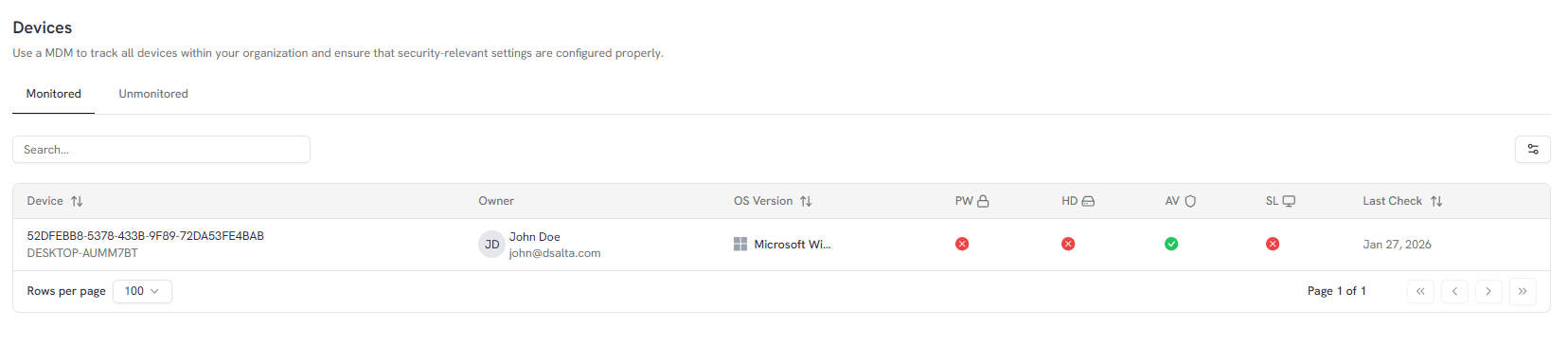
These values appear on the **Devices** page as the PW, HD, AV and SL columns, alongside the owner, OS version and Last Check date.
 ## What is NOT collected
DSALTA does **not** collect:
* Files or file contents
* Browsing history
* Keystrokes or screen recordings
* Passwords or secrets
* Personal documents
All checks are designed to be privacy-safe and audit-focused. The Device Monitor uses read-only access and applies no destructive actions.
## Password manager detection
DSALTA checks whether a supported password manager is installed and running. Detection is by process, so the application must be running to be detected — not merely installed.
Currently detected password managers:
* 1Password
* LastPass
* Bitwarden
* KeePass
* Dashlane
* NordPass
* RoboForm
* Keeper
* Enpass
* Proton Pass
If none of these are detected, the Password Manager check fails.
## Related pages
* [What Is Device Management?](/guides/device-management/overview)
* [How Device Management works](/guides/device-management/how-it-works)
* [Fix failed device checks](/guides/device-management/fix-failed-checks)
## What is NOT collected
DSALTA does **not** collect:
* Files or file contents
* Browsing history
* Keystrokes or screen recordings
* Passwords or secrets
* Personal documents
All checks are designed to be privacy-safe and audit-focused. The Device Monitor uses read-only access and applies no destructive actions.
## Password manager detection
DSALTA checks whether a supported password manager is installed and running. Detection is by process, so the application must be running to be detected — not merely installed.
Currently detected password managers:
* 1Password
* LastPass
* Bitwarden
* KeePass
* Dashlane
* NordPass
* RoboForm
* Keeper
* Enpass
* Proton Pass
If none of these are detected, the Password Manager check fails.
## Related pages
* [What Is Device Management?](/guides/device-management/overview)
* [How Device Management works](/guides/device-management/how-it-works)
* [Fix failed device checks](/guides/device-management/fix-failed-checks)